

AI & AUTOMATION
Less busywork.
More possibility.
Connect your tools, remove repetitive handoffs and put useful AI to work—with people in control of the decisions that matter.
FROM REQUEST TO RESPONSIBLE ACTION
- 01Receive the request
- 02Find the context
- 03Apply the policy
- 04Review, then act
01 / FIND THE FRICTION
The work between
the work.
- 01Request arrives
- 02Context is scattered
- 03Handoffs multiply
- 04Time is lost
A request arrives. Someone reads it, finds the right account, asks a colleague for context and copies the same details into another tool. None of those steps looks large on its own. Together, they delay the work people are actually there to do.
The useful question is which steps can become reliable and repeatable, which need better information, and which depend on judgment. Automating an unclear process can move its errors faster.
Where is information entered more than once?
Which handoffs wait for someone to notice them?
Which decisions need context that is hard to find?
NOVA / INDEPENDENT CONCEPT
AI OPERATIONS / WEB APPLICATION
Automation you can
understand.
NOVA brings requests, context, permissions and human review into one operational workspace. Explore the product thinking behind controlled automation.
02 / CHOOSE THE RIGHT WORK
Prioritise the process.
Then choose the technology.
- 01Rules & stable inputs
- 02AI & variable inputs
- 03People & judgment
We assess volume, consistency, data quality, business value and the cost of a mistake. A useful first workflow has a defined owner, observable inputs and a measurable outcome. High volume alone does not make a process safe to automate.
Clear rule, stable input
Use deterministic rules when the answer can be defined and tested. Many valuable automations do not require a language model.
Variable input, useful context
AI may help classify, extract or draft from unstructured information. Test it against representative examples and define how uncertainty will be handled.
Sensitive or uncertain decision
Require an authorised person to review the context and proposed action. Policy can require approval even when a model appears confident.
03 / CONTROLLED ORCHESTRATION
A route you can
understand.
- 01Receive
- 02Retrieve context
- 03Check policy
- 04Review → act
A workflow needs more than a successful first run. We define the normal path, the exceptions and the record of each action. AI agents, where useful, operate inside those same access and decision boundaries.
A request arrives through email, a form or a business event.
Retrieve the relevant account, records and approved policy.
Apply rules, evaluate uncertainty and choose the permitted route.
Execute authorised work and record what changed.
DECISION → HUMAN REVIEW → PERMITTED ACTION
Uncertain inputs or sensitive changes pause before execution. The reviewer can approve, amend or reject the proposal. Rejection and failed execution need defined outcomes, not silent retries.
TRACE / Record the input, decision, reviewer where required, action and result.
04 / INTELLIGENCE IN OPERATION
AI SHOULDN’T BE
AN ADD-ON.
It should change how the business works. Connect inputs to context, decisions and actions. Keep people in control where judgment matters.
INTERACTIVE POLICY DEMONSTRATION / NO LIVE SYSTEM
Approve / Amend / Reject
↑Repeatable work. Defined permissions.
A routine request follows policy. Every permitted action leaves a trace.
Sensitive change. Action held.
A billing change requires a person to approve it before execution, even when classification confidence is high.
Uncertainty surfaced. Context requested.
The system asks for clarification rather than silently guessing. A person resolves the ambiguity before work continues.
Different functions.
The same need for control.
These are possible applications to assess against your process and systems. They are not a promise that every task should be automated.
- 01Support
- 02Operations
- 03CRM
- 04Knowledge
Sales
Route an enquiry using its subject, existing account and agreed ownership rules. Preserve the information a salesperson needs to respond.
CRM
Validate proposed changes and update approved fields. Sensitive account or billing changes can require human approval before a write.
Support
Classify requests, retrieve approved knowledge and prepare a response. Escalate cases where the source does not support a reliable answer.
Content
Organise inputs and prepare drafts from approved material. Keep factual review, editorial judgment and publication approval with people.
Data
Extract and validate information against an expected structure. Quarantine missing or conflicting values instead of quietly filling the gaps.
Reporting
Assemble defined reports from accessible systems. Keep source records and calculation rules visible so the result can be checked.
Operations
Coordinate handoffs, reminders and routine process steps. Give exceptions an owner and a clear route back into the workflow.
04 / WORK WITH THE SYSTEMS YOU HAVE
Connect the context.
Respect the boundaries.
- 01Map existing tools
- 02Connect safely
- 03Keep ownership
We first check what the existing systems expose: supported interfaces, authentication, permissions, data ownership and operational limits. Integration may use an API, webhook or a controlled batch process. The choice depends on the system and the work, not a preferred list of tools.
READ — Email / CRM / Support / Approved knowledge
CONTROL — Permissions / Validation / Policy / Human review / Audit record
WRITE — Approved account changes / Tasks / Responses / Reports
Failed connections and duplicate events need deliberate handling. We define retries, alerts and recovery routes, and establish who maintains the integration after handover.
05 / KEEP JUDGMENT IN THE SYSTEM
AUTOMATE REPEATABLE WORK.
SURFACE UNCERTAINTY.
KEEP PEOPLE IN CONTROL
WHERE JUDGMENT MATTERS.
- 01Set boundaries
- 02Review uncertainty
- 03Record decisions
- 04Measure quality
A reviewer needs the source context, the proposed change and a clear reason for the escalation. Approval should follow business policy rather than a confidence score alone.
We define who can review each decision, which changes require approval and what is recorded. Access should be limited to the work the workflow needs. Sensitive data and consequential decisions require requirements to be agreed before implementation.
HOW VANTIFY WORKS
A clear sequence. Room for what we learn.
UNDERSTAND
Review the business goal, users, existing systems and constraints. Agree what needs to change before choosing tools.
ARCHITECT
Define the workflow, responsibilities and measures. Resolve dependencies and decide what should happen when something goes wrong.
BUILD
Implement a bounded version, test real scenarios and document how the team will use and maintain it.
SCALE
Compare results with the baseline. Improve the process and expand only when the evidence supports it.
06 / MEASURE WHAT CHANGES
A useful baseline.
An accountable result.
Before implementation, agree how the process performs now and how success will be evaluated. Review a pilot against that baseline. Time saved can be offset by new review work, so measure the whole process rather than one automated step.
Cycle time
Compare elapsed time from request to resolution, including waiting and review.
Quality and exceptions
Track failed actions, corrected outputs and the reasons work leaves the normal path.
Review workload
Check how often people intervene, how long review takes and whether reviewers have enough context.
Adoption and ownership
Confirm that people use the workflow and that someone can monitor, maintain and improve it.
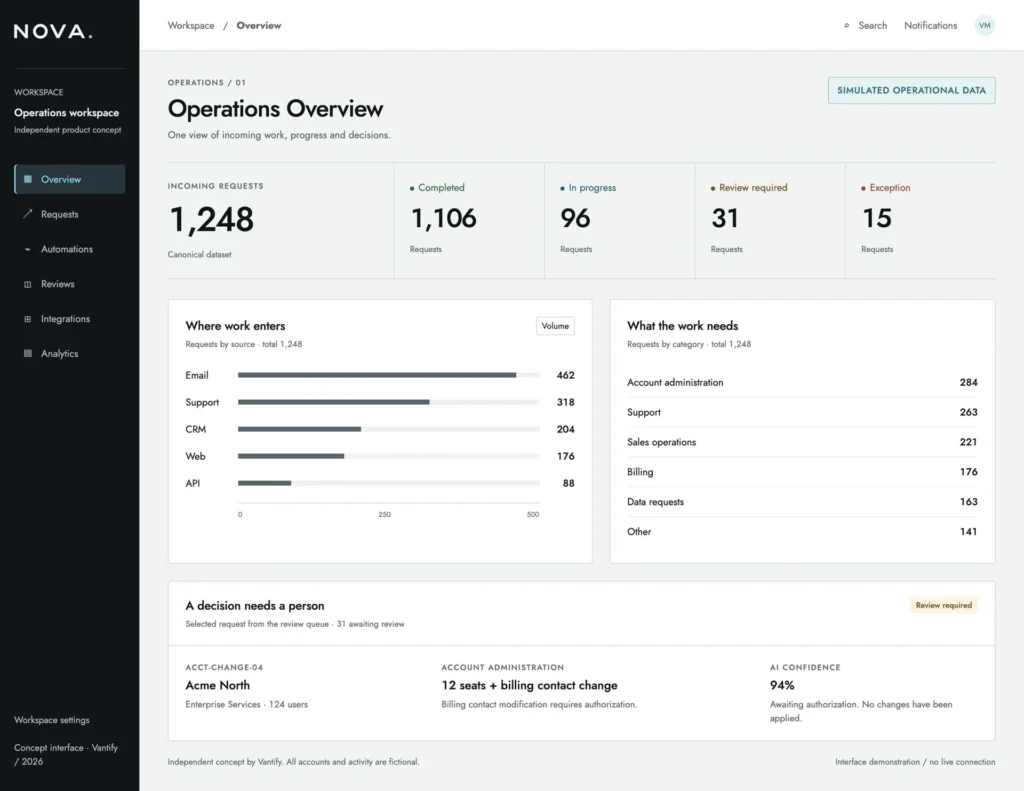
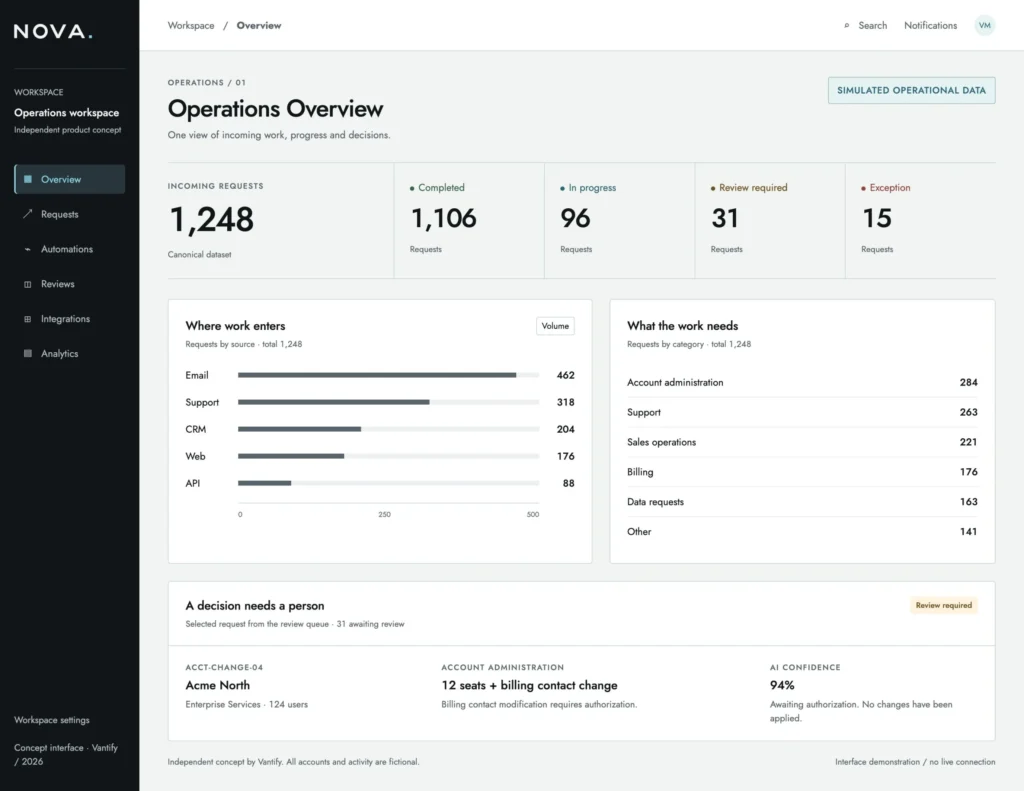
NOVA / AI OPERATIONS / INDEPENDENT CONCEPT
Account changes.
With accountability.
NOVA is a self-initiated operational intelligence concept exploring account-change requests, controlled automation and human review. It shows how classification, policy and a proposed action can be made understandable to the person responsible for the decision.
Independent concept. Not a client engagement, deployed product or evidence of business performance. Any operational data in the case study is simulated.
Questions before we begin
What business processes can be automated?
Repeated tasks with clear inputs, rules and ownership are useful candidates. Examples include routing requests, updating approved CRM fields, assembling reports and coordinating routine handoffs. The assessment should also identify steps that need better process design or human judgment.
Do we need to replace our existing systems?
Not necessarily. We assess the interfaces, permissions and data available in your current tools. Existing systems can often remain part of the workflow, but compatibility and maintenance needs must be checked before the scope is agreed.
Where should AI not be used?
A deterministic rule is preferable when it can perform the task reliably. AI should not make sensitive or consequential decisions without appropriate controls, and it should not be used where the available data cannot support a dependable outcome. A workflow may be useful with no AI component at all.
How does human approval work?
The workflow pauses before the controlled action. An authorised reviewer sees the relevant context, the proposed change and the reason review is required. The reviewer can approve, amend or reject it, and the decision becomes part of the record.
Can it connect to our CRM?
That depends on the CRM, available interfaces, permissions and the fields or actions involved. We review those constraints first, then define what the workflow can read and write. We do not assume unrestricted access or compatibility with every platform.
How do you choose the first automation opportunity?
We compare business value with process stability, data quality, implementation effort and the consequence of an error. A bounded pilot with a clear owner and baseline is often a useful starting point. High-risk decisions need more controls before automation is considered.
What happens if the workflow fails?
The design should identify failed actions, stop unsafe continuation and notify the responsible person. Retries need limits and protection against duplicate actions. Recovery, monitoring and ongoing ownership are agreed as part of the implementation scope.
RELATED CAPABILITIES
Connect the next capability.
Process redesign may be the necessary first step. Digital Transformation addresses the operating model; Web Design & Development shapes the customer interface that supplies the workflow.
What are you trying to change?
Describe the business problem, the people it affects and the point where progress slows down.